QBO Access · For clients

Give Bookkeepers Lane access to your QuickBooks Online company.

Accountant access lets us review your books, identify issues and build your reporting — without ever needing your username or password.

⏱ It only takes about 2 minutes
Our Firm ID
9341453681153696
Please enter this exactly as shown.

⚠  Never send us your QuickBooks password

We will never ask for your QuickBooks Online username, password, or a login code — and you should never send them to us or to anyone else who asks. If you ever receive a message that appears to come from Bookkeepers Lane asking for your login details, it is not from us. Call us at 404-330-9369.

Accountant access is granted through QuickBooks’ own invitation system, using the two steps below. You stay the owner of your account, we get our own separate login, and you can remove our access yourself at any time.

1

Open Manage users and go to Accounting Firms

  • Sign in to QuickBooks Online as the Primary Admin.
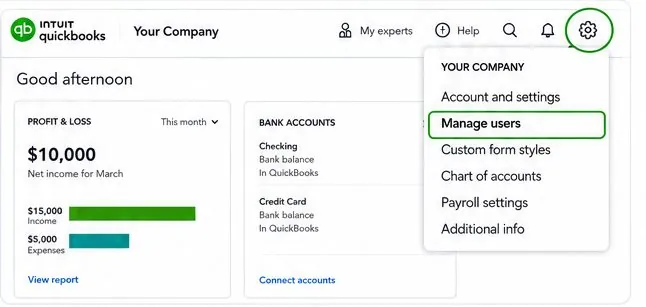
  • Click the Gear icon in the top right.
  • Select Manage users.
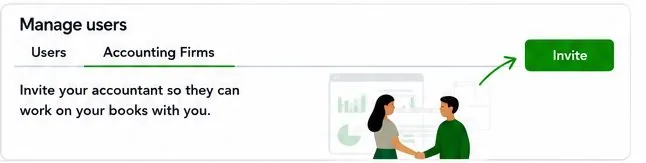
  • On the Manage users page, open the Accounting Firms tab, then click Invite.
QuickBooks Online gear menu with Manage users highlighted Manage users page, Accounting Firms tab with Invite button
2

Enter our Firm ID and save

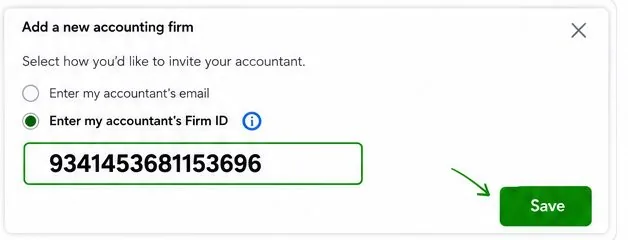
  • Choose Enter my accountant’s Firm ID.
  • Enter our Firm ID:
    9341453681153696
  • Click Save. That’s it — nothing else is needed from you, and no password is ever shared.
Add a new accounting firm dialog with Firm ID entered
✓

You’re all set

We receive the invitation automatically. Once it is accepted, we have the access we need — no further action on your end.

What accountant access lets us do:

  • Review the current condition of your books
  • Identify bookkeeping issues and reconciliation gaps
  • Prepare accurate financial reports
  • Build the reporting and insights that help you run the business

Any corrections or cleanup work is scoped and agreed with you first.

🛡

How we handle your information

Your financial information is treated as confidential. Bookkeepers Lane may use secure third-party tools and technology to support bookkeeping, review, workflow, and reporting services. Access is limited to what is needed to provide the services you authorize.

During a diagnostic review, we review your QuickBooks file to understand the condition of the books. We do not begin cleanup work or make material changes to historical records without your authorization.

You can review or remove our access at any time in the same Manage users section.
Need a hand?

Stuck on a step? We’ll walk you through it.

If the Accounting Firms tab isn’t showing, or you aren’t sure whether you’re the Primary Admin, reach out and we’ll sort it out with you.

Or send us a quick question

Tell us what you’re dealing with and we’ll get back to you personally — usually the same business day.

No newsletter, no sales sequence — just an answer.